
Kubernetes on AWS - EKS Auto Mode vs ROSA
Introduction
If you’re looking to run Kubernetes workloads on AWS, two managed options are likely to come up in your evaluation: Amazon EKS Auto Mode and Red Hat OpenShift Service on AWS (ROSA). Both promise to reduce the operational burden of running Kubernetes at scale, but they take fundamentally different approaches and suit different organisations.
In this post I’ll cover what each service offers, where they differ, and how to think about which is the right fit for your environment. My view, if you’re already working within the AWS ecosystem, is that EKS Auto Mode is the stronger choice — but there are scenarios where ROSA makes sense, and I’ll cover those too.
The architecture diagrams in this post have been created using Eraser.io.
What is EKS Auto Mode?
Amazon EKS Auto Mode was announced at AWS re:Invent 2024 and represents a significant step forward in how AWS manages Kubernetes infrastructure. Prior to Auto Mode, EKS required you to manage your own node groups — choosing instance types, configuring launch templates, patching AMIs, and handling node scaling logic. Auto Mode changes this completely.
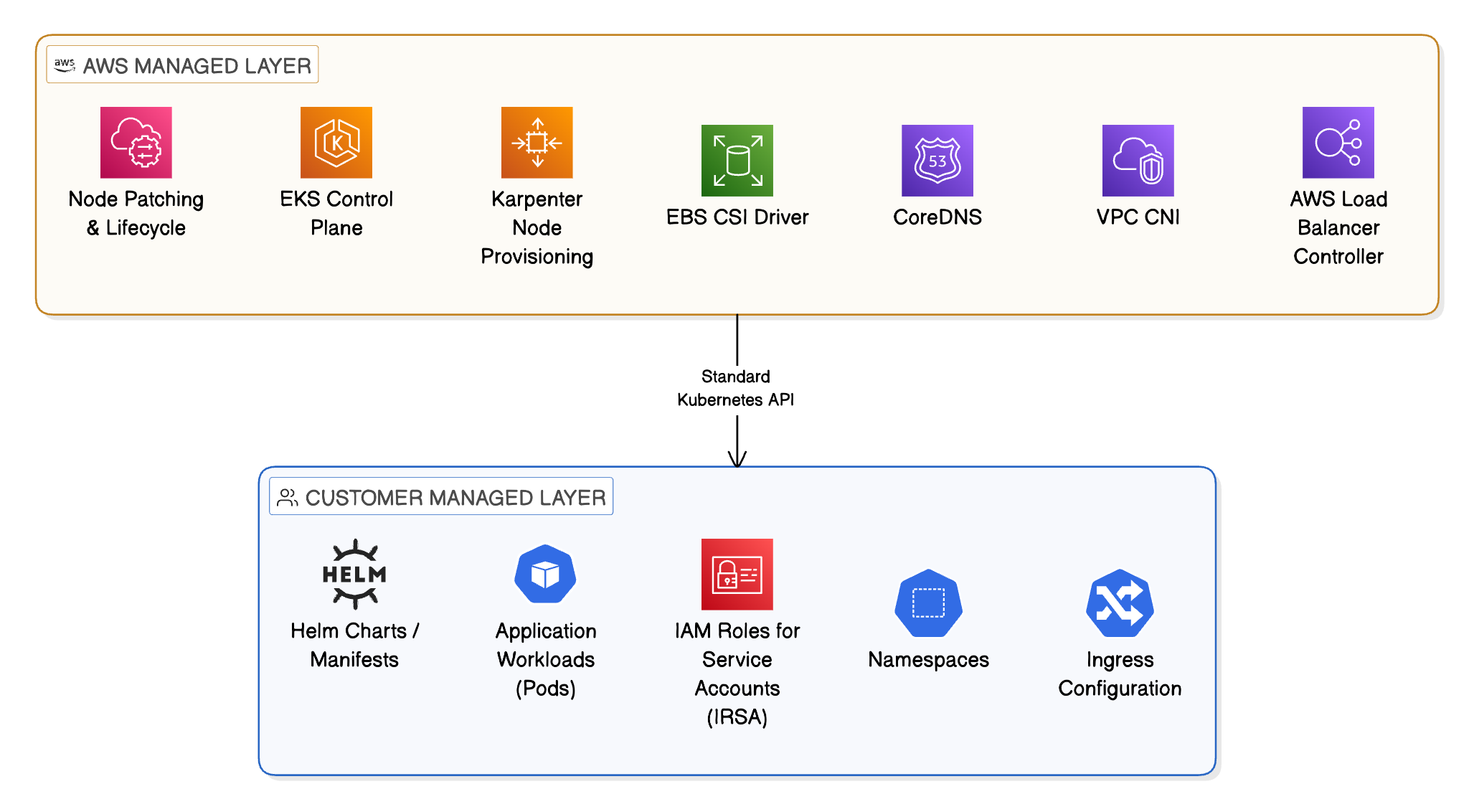
With EKS Auto Mode, AWS takes full responsibility for the compute layer. This includes:
- Automatic node provisioning: AWS provisions nodes on demand using built-in Karpenter integration, selecting the right instance type and size for your workloads
- Automatic node lifecycle management: Nodes are patched, upgraded, and replaced by AWS without manual intervention
- Built-in add-on management: Core cluster components including the VPC CNI, CoreDNS, kube-proxy, and EBS CSI driver are managed and updated by AWS
- Integrated load balancing: The AWS Load Balancer Controller is included, enabling native ALB and NLB integration for Kubernetes services and ingresses
- Storage management: EBS volume provisioning and lifecycle is handled automatically through the built-in storage classes
Crucially, EKS Auto Mode still runs standard upstream Kubernetes. Your existing Helm charts, Kubernetes manifests, and tooling work without modification. There is no proprietary abstraction layer on top of Kubernetes itself.
How EKS Auto Mode Manages Your Cluster
What is ROSA?
Red Hat OpenShift Service on AWS (ROSA) is a jointly managed service from AWS and Red Hat that runs OpenShift — Red Hat’s enterprise Kubernetes distribution — on AWS infrastructure. It is available in two deployment models:
- ROSA Classic: The original model where the OpenShift control plane runs within your own AWS account
- ROSA with Hosted Control Plane (HCP): A newer, more efficient model where the control plane is hosted by Red Hat, reducing your account-level resource footprint and improving cluster creation times significantly
ROSA bundles several capabilities on top of standard Kubernetes:
- OpenShift Web Console: A feature-rich UI for developers and administrators that goes well beyond the standard Kubernetes dashboard
- OperatorHub: A curated catalogue of certified Kubernetes operators for deploying common middleware, databases, and tooling
- OpenShift Pipelines: A Tekton-based CI/CD pipeline solution included with the platform
- OpenShift GitOps: ArgoCD-based GitOps tooling, pre-integrated and supported
- ImageStreams and BuildConfigs: OpenShift-native container image build and promotion workflows
- Red Hat Enterprise Linux CoreOS (RHCOS): All worker nodes run RHCOS, a Red Hat-managed and security-hardened operating system
ROSA is targeted at organisations that have standardised on OpenShift across their infrastructure — typically those running on-premises OpenShift clusters who want a consistent operational model in AWS, or enterprises with Red Hat Enterprise Agreements that make the licensing economics attractive.
Key Differences
Management Overhead
Both services are managed offerings, but the scope of what is managed differs.
With EKS Auto Mode, AWS manages the Kubernetes control plane, node provisioning, node lifecycle, and core cluster add-ons. You retain full control of your workload configuration through the standard Kubernetes API and bring your own tooling for CI/CD, GitOps, and application management.
With ROSA, Red Hat and AWS jointly manage not just the infrastructure but also a broader set of platform components including the CI/CD tooling, GitOps operator, and monitoring stack. The trade-off is that this opinionated approach means some platform components are managed for you but also that you have less flexibility to swap them out for alternatives.
For teams that already have established tooling preferences — such as ArgoCD, Flux, or GitHub Actions for CI/CD — the additional bundled components in ROSA can feel like overhead rather than value.
Cost
Cost is one of the most significant differences between the two services.
EKS Auto Mode charges for the EKS cluster fee (currently $0.10 per hour) plus the underlying EC2 and storage resources provisioned for your workloads. There are no additional software licensing fees. With Auto Mode’s Karpenter-based node provisioning, you can take advantage of Spot Instances and right-sizing to further reduce costs.
ROSA carries an additional OpenShift licensing fee on top of the underlying AWS infrastructure costs. Depending on your workload size and whether you have an existing Red Hat Enterprise Agreement, this can represent a meaningful cost premium compared to EKS. For organisations without existing Red Hat licensing, this is an important factor to model before committing to ROSA.
AWS-Native Integration
EKS Auto Mode has a clear advantage here. Because it is an AWS-first service, integrations with the broader AWS ecosystem are first-class:
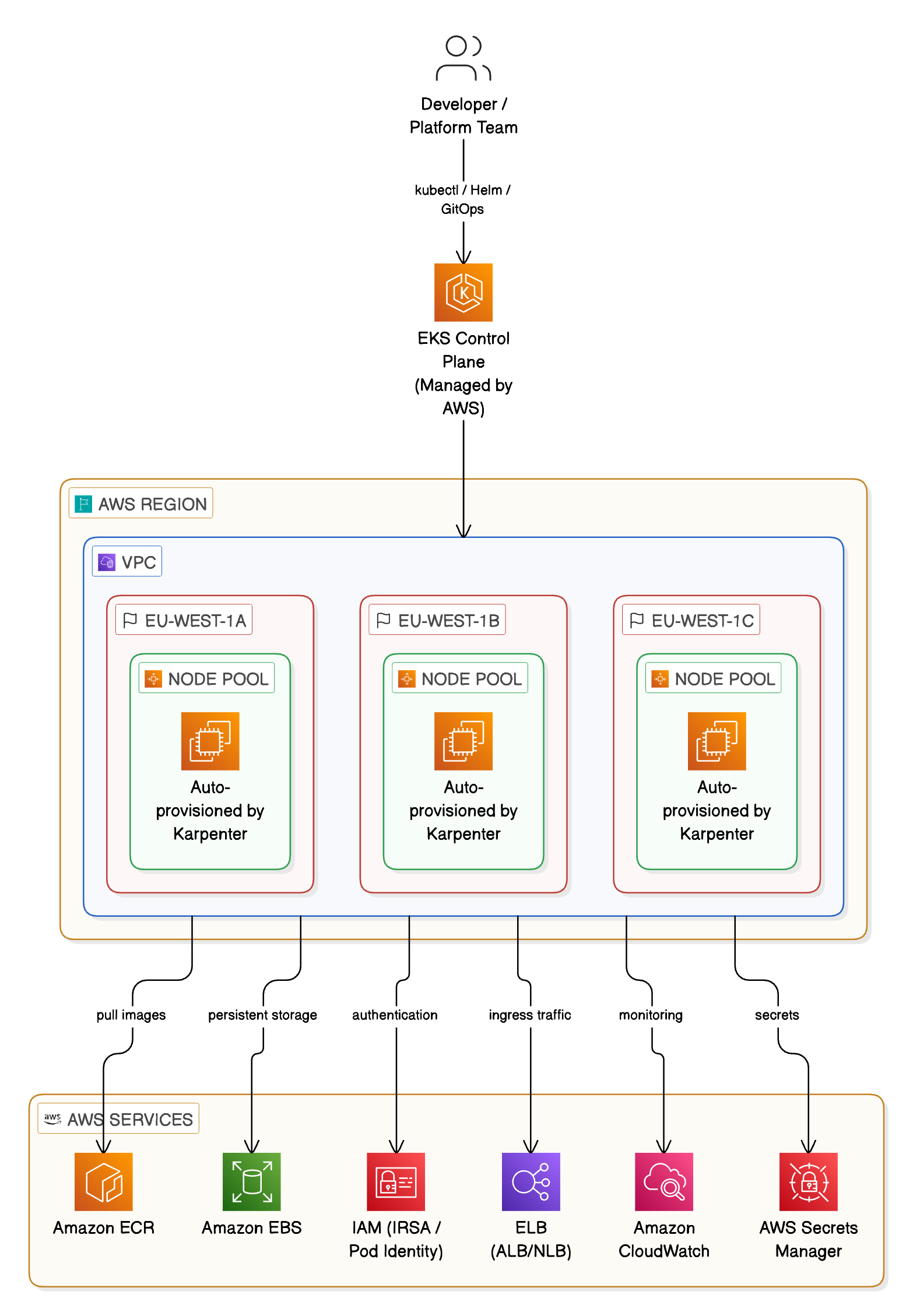
- IAM Roles for Service Accounts (IRSA) and EKS Pod Identity for fine-grained workload permissions
- Amazon ECR for container image management with native credential handling
- AWS Secrets Manager and Parameter Store integration via the Secrets Store CSI driver
- VPC-native networking with the VPC CNI, giving pods real VPC IP addresses and full AWS networking behaviour
- CloudWatch Container Insights for observability
- AWS Security Hub, GuardDuty, and Inspector for security posture management
ROSA runs on AWS but is architected around the Red Hat/OpenShift model first. Many of the same integrations are possible, but they often require additional configuration or rely on OpenShift-specific mechanisms rather than the native AWS approach your other services are likely already using.
Kubernetes Compatibility
EKS Auto Mode runs standard upstream Kubernetes with no proprietary extensions to the API. Anything that works on vanilla Kubernetes works on EKS Auto Mode without modification. This matters for portability, community tooling support, and the long-term maintainability of your platform configuration.
OpenShift, and therefore ROSA, introduces additional API resources and conventions — Routes instead of standard Ingress, ImageStreams for container images, SCCs (Security Context Constraints) in place of standard Pod Security Admission. Whilst OpenShift has improved its compatibility with upstream Kubernetes over recent versions, these differences still present friction when migrating workloads from other Kubernetes environments or when using tooling written against the standard API.
Operational Model
| Dimension | EKS Auto Mode | ROSA |
|---|---|---|
| Control plane management | AWS | AWS + Red Hat |
| Worker node management | AWS (Auto Mode) | AWS + Red Hat |
| Node OS | AWS-optimised AL2023 | Red Hat Enterprise Linux CoreOS |
| CI/CD tooling | Bring your own | OpenShift Pipelines (Tekton) included |
| GitOps tooling | Bring your own | OpenShift GitOps (ArgoCD) included |
| Kubernetes API | Standard upstream | OpenShift-extended |
| Pricing model | AWS infrastructure + EKS fee | AWS infrastructure + OpenShift licence |
| Best for | AWS-native teams | Existing OpenShift / Red Hat shops |
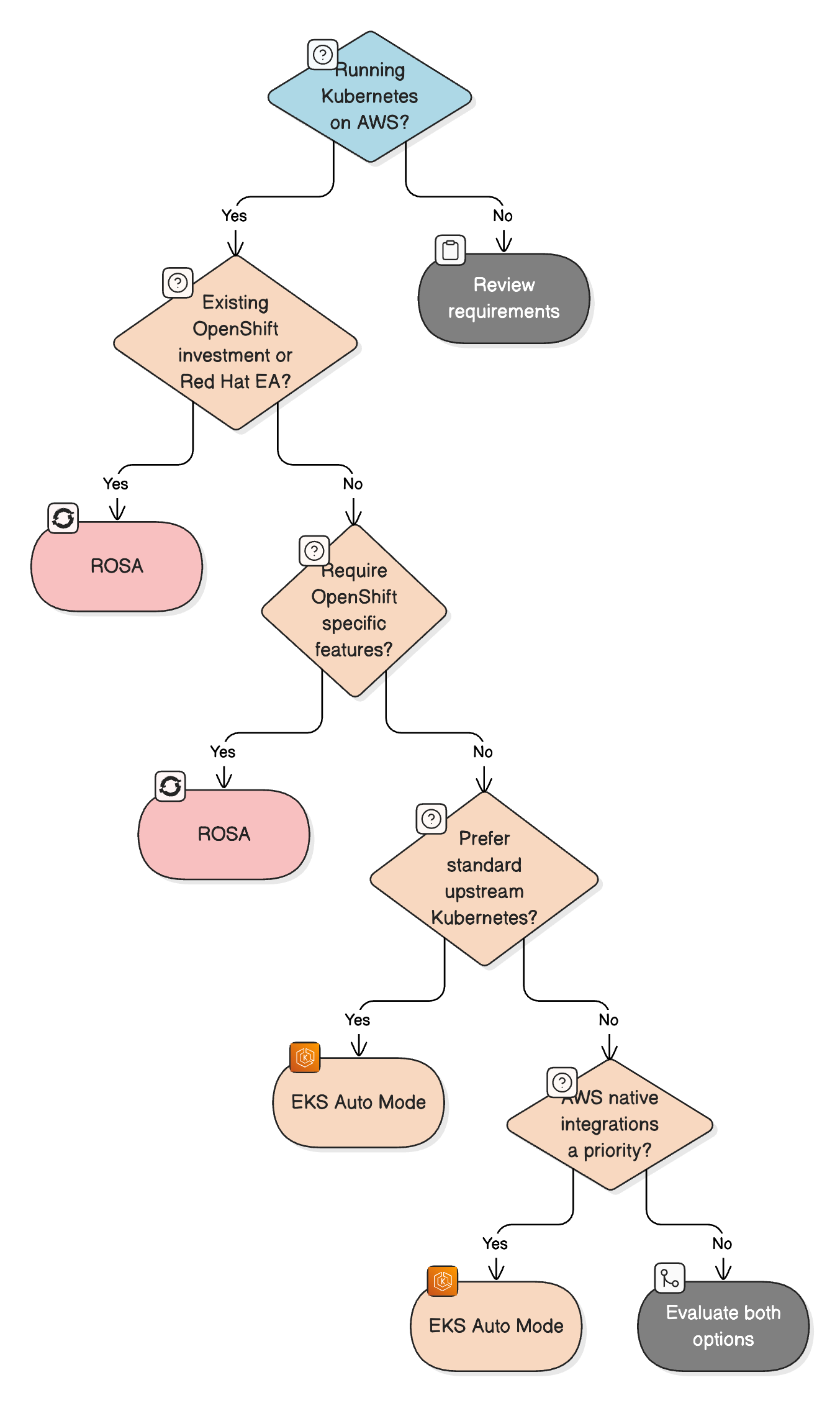
EKS Auto Mode vs ROSA — Decision Flow
When ROSA Makes Sense
Despite EKS Auto Mode being my preferred choice for AWS-native teams, ROSA is the right answer in several scenarios:
Existing OpenShift footprint: If your organisation already runs on-premises OpenShift clusters and wants a consistent developer experience and operational model in AWS, ROSA delivers that without retraining your platform teams or rewriting your platform tooling.
Red Hat Enterprise Agreement: If your organisation has a broad Red Hat subscription, the OpenShift licensing for ROSA may already be covered, eliminating the cost premium compared to EKS.
Regulated industries with Red Hat certification requirements: Some regulated industries have supplier assurance requirements or approved technology lists that include Red Hat but not necessarily AWS-native tooling. In these cases ROSA may be required to meet compliance obligations.
Hybrid or multi-cloud OpenShift strategy: If your organisation is deploying OpenShift across multiple cloud providers or on-premises with a goal of workload portability, ROSA keeps you in the OpenShift ecosystem on AWS.
Why EKS Auto Mode is the Stronger Default
For teams that are already working in AWS and have not made a prior investment in OpenShift, EKS Auto Mode is the more compelling choice for several reasons.
Reduced operational burden without lock-in: Auto Mode removes the historically significant operational overhead of managing EKS node groups whilst keeping you on standard Kubernetes. You are not locked into a proprietary platform model.
Cost efficiency: Without the OpenShift licensing overhead, EKS Auto Mode is more cost-effective. Combined with Spot Instance support and Karpenter’s bin-packing behaviour, the infrastructure costs are typically lower than ROSA for equivalent workloads.
Deep AWS integration: The integrations with IAM, VPC, ECR, Secrets Manager, CloudWatch, and the AWS security toolset are seamless. If you’re building in AWS, these integrations reduce complexity rather than adding it.
Ecosystem and community: The upstream Kubernetes ecosystem is vast. Helm, Kustomize, ArgoCD, Flux, Crossplane, and virtually every CNCF project works natively on EKS. You have the flexibility to adopt the best tool for each job rather than being guided towards the OpenShift-bundled equivalent.
Reduced blast radius for upgrades: With Auto Mode, AWS manages Kubernetes version upgrades for the data plane in a rolling fashion. Because the underlying platform is standard Kubernetes, upgrade risks are well understood and well-documented across the community.
EKS Auto Mode — High Level Architecture
Summary
Both EKS Auto Mode and ROSA are capable managed Kubernetes services on AWS, but they are designed for different audiences.
ROSA is the right choice if you have existing OpenShift investments, Red Hat licensing commitments, or a strategic requirement to standardise on OpenShift across your infrastructure. It provides a consistent OpenShift experience with the backing of both AWS and Red Hat.
EKS Auto Mode is the right choice for the majority of AWS-native teams. It eliminates the long-standing pain of managing EKS node groups, delivers deep AWS integrations, runs standard upstream Kubernetes, and does so without the cost and complexity of an OpenShift licensing layer. For teams starting fresh on AWS or looking to modernise an existing EKS deployment, Auto Mode is the natural destination.
The key question to ask is: are you building on AWS, or are you building on OpenShift? If the answer is AWS, EKS Auto Mode gives you a fully managed, standards-based Kubernetes platform that gets out of your way and lets you focus on your workloads.