
AWS Cloud WAN - Part One Design
Introduction
Welcome back to another post. In this two-part series I’m going to be covering AWS Cloud WAN, a relatively new service from AWS that provides a centralised way to build, manage, and monitor global wide area networks. If you’ve been working with AWS Transit Gateway to connect your VPCs and on-premises networks, Cloud WAN is the natural evolution of that approach — offering a unified global network fabric with policy-based management.
In this first part I’ll be focusing on the design aspects of Cloud WAN — what it is, its core components, and how to design a network topology that supports segmentation, multi-region connectivity, and integration with existing infrastructure. In Part Two I’ll walk through the implementation steps in the AWS console, including creating the core network, defining policies, and attaching VPCs.
The architecture diagrams in this series have been created using Eraser.io.
What is AWS Cloud WAN?
AWS Cloud WAN is a managed wide area networking service that allows you to build, manage, and monitor a unified global network. It provides a central dashboard through AWS Network Manager to connect your on-premises networks and Amazon VPCs across AWS Regions through a core network that spans the AWS global infrastructure.
Prior to Cloud WAN, organisations typically relied on Transit Gateway deployed per-region with inter-region peering to achieve multi-region connectivity. Whilst Transit Gateway remains an excellent choice for single-region deployments, Cloud WAN simplifies the management of networks that span multiple regions by providing a single global view and policy-driven configuration.
Benefits of AWS Cloud WAN
- Centralised Management: A single dashboard to manage your entire global network topology across all AWS Regions
- Policy-Driven Configuration: Define network behaviour through declarative JSON policies rather than manual route table management
- Segmentation: Built-in network segmentation that isolates traffic between different environments or business units
- Multi-Region by Design: Native support for cross-region connectivity without manually configuring inter-region peering
- Integration: Supports VPC attachments, Site-to-Site VPN, Direct Connect, and Transit Gateway peering
- Operational Visibility: Integrated with AWS Network Manager for topology visualisation, route analysis, and event monitoring
Core Components
Before designing a Cloud WAN network, it is important to understand the core components that make up the service. Each component plays a specific role in how the network is constructed and managed.
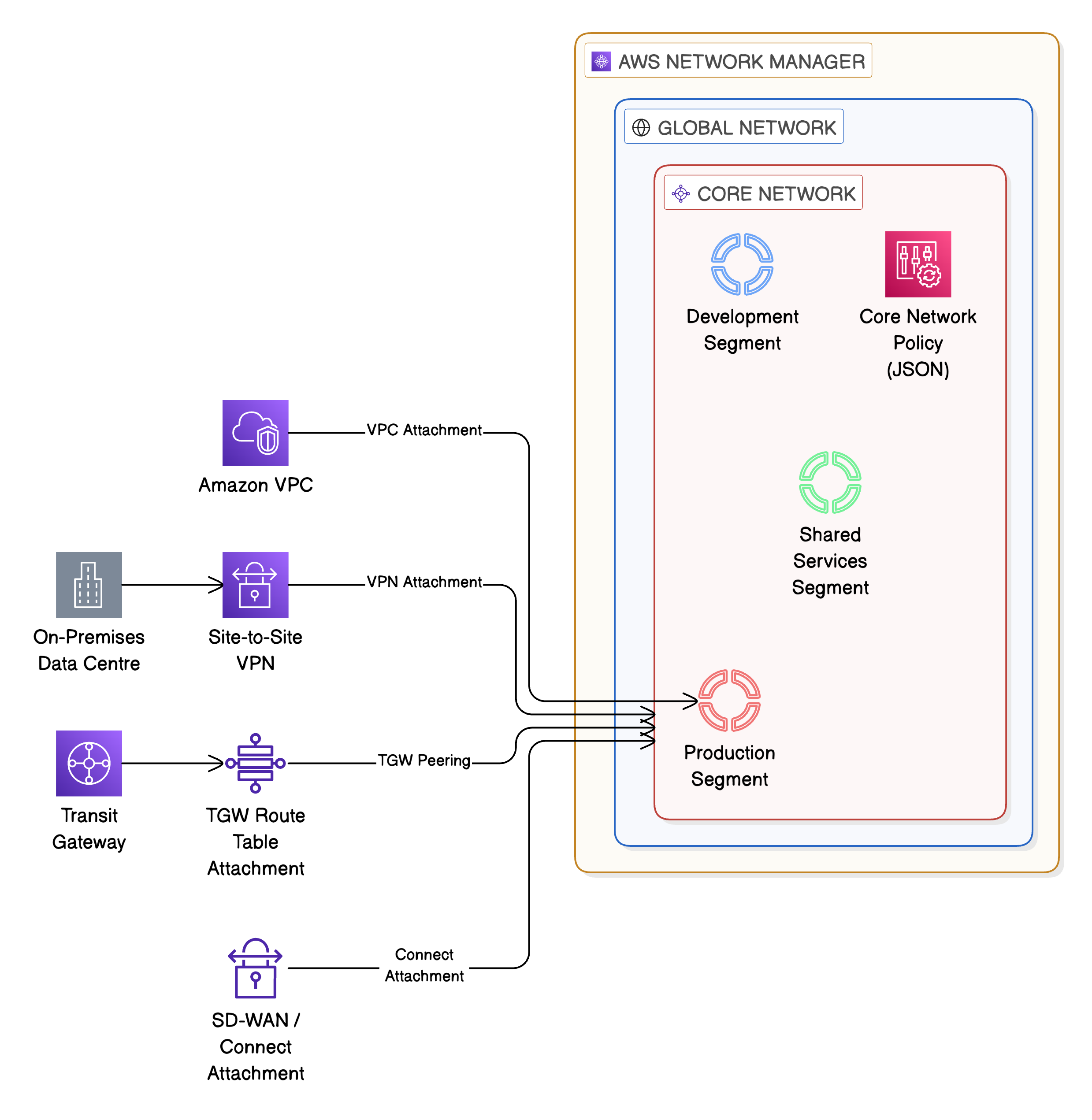
Global Network
The Global Network is the top-level container for your Cloud WAN resources. It represents your entire wide area network and is the parent resource under which the core network and all associated resources are organised. A Global Network is created within AWS Network Manager.
Core Network
The Core Network is the managed network fabric that Cloud WAN creates and operates on your behalf. It handles the underlying infrastructure — the routing, the cross-region connectivity, and the attachment management. You define what the core network should look like through a Core Network Policy, and Cloud WAN provisions the necessary infrastructure.
Core Network Policy
The Core Network Policy is a JSON document that defines the behaviour of your core network. This is where you specify which AWS Regions are included, what network segments exist, how attachments are associated with segments, and what routing behaviour should be applied. The policy is versioned, allowing you to review and roll back changes.
Segments
Segments are logical isolation boundaries within your core network. Each segment maintains its own route table and traffic within a segment is isolated from other segments by default. This is analogous to having separate route domains — for example, you might create segments for Production, Development, and Shared Services. Segments can optionally share routes with other segments where cross-segment communication is required.
Attachments
Attachments are the connections between your resources and the core network. Cloud WAN supports several attachment types:
- VPC Attachments: Connect Amazon VPCs to the core network
- Site-to-Site VPN Attachments: Connect on-premises sites via IPSec VPN tunnels
- Transit Gateway Route Table Attachments: Peer with existing Transit Gateways for migration or hybrid connectivity
- Connect Attachments: Support SD-WAN and third-party network appliance integration via GRE tunnels
AWS Network Manager
AWS Network Manager provides the operational dashboard for Cloud WAN. It offers topology visualisation, route analysis, event logging, and CloudWatch integration. Network Manager is where you create your Global Network and manage the lifecycle of your core network.
AWS Cloud WAN — Core Components Hierarchy
Designing a Cloud WAN Network
With an understanding of the core components, we can now look at how to design a Cloud WAN network. The design considerations covered here are applicable to most enterprise deployments and focus on multi-region topology, segmentation strategy, and routing.
Multi-Region Topology
One of the primary advantages of Cloud WAN is its native multi-region support. When defining your Core Network Policy, you specify which AWS Regions the core network should operate in. Cloud WAN automatically provisions the cross-region connectivity between these regions through the AWS global backbone.
For a typical enterprise deployment, you would include the regions where your workloads reside along with any regions used for disaster recovery. For example, an organisation operating in Europe and North America might include eu-west-1 (Ireland), eu-west-2 (London), us-east-1 (N. Virginia), and us-west-2 (Oregon).
Segmentation Strategy
Segmentation is at the heart of Cloud WAN design. A well-designed segmentation strategy provides traffic isolation between environments whilst allowing controlled communication where required.
A common segmentation pattern for enterprise deployments includes:
- Production Segment: Isolates all production workloads. Strict routing policies with limited cross-segment access
- Development Segment: Contains development and testing environments. Isolated from production to prevent accidental cross-environment communication
- Shared Services Segment: Hosts centralised services such as Active Directory, DNS resolvers, monitoring tools, and CI/CD infrastructure. This segment typically shares routes with both Production and Development segments
- Inspection Segment (optional): Dedicated segment for centralised traffic inspection using AWS Network Firewall or third-party appliances. Traffic from other segments is routed through this segment for inspection before reaching its destination
The segmentation is defined within the Core Network Policy. Below is an example of how segments might be defined:
{
  "segments": [
    {
      "name": "production",
      "description": "Production workloads",
      "require-attachment-acceptance": true,
      "isolate-attachments": false
    },
    {
      "name": "development",
      "description": "Development and testing workloads",
      "require-attachment-acceptance": true,
      "isolate-attachments": false
    },
    {
      "name": "shared-services",
      "description": "Centralised shared services",
      "require-attachment-acceptance": true,
      "isolate-attachments": false
    }
  ]
}
The require-attachment-acceptance flag is important for governance — it ensures that attachments to a segment must be explicitly approved rather than being automatically accepted. This prevents unauthorised VPCs from joining a segment.
Routing Design
Cloud WAN supports two primary routing approaches within the Core Network Policy:
- Segment Sharing: Allows segments to share routes with other specified segments. For example, the Shared Services segment can share its routes with both Production and Development, allowing workloads in those segments to reach centralised services
- Segment Actions: Define routing behaviour such as sending traffic to an inspection segment before it reaches its destination. This is used for centralised traffic inspection patterns
An example of segment sharing configuration:
{
  "segment-actions": [
    {
      "action": "share",
      "mode": "attachment-route",
      "segment": "shared-services",
      "share-with": ["production", "development"]
    }
  ]
}
This configuration shares routes from the Shared Services segment with Production and Development, enabling workloads in those segments to communicate with shared resources such as DNS and Active Directory.
Multi-Region Cloud WAN Topology with Segmentation
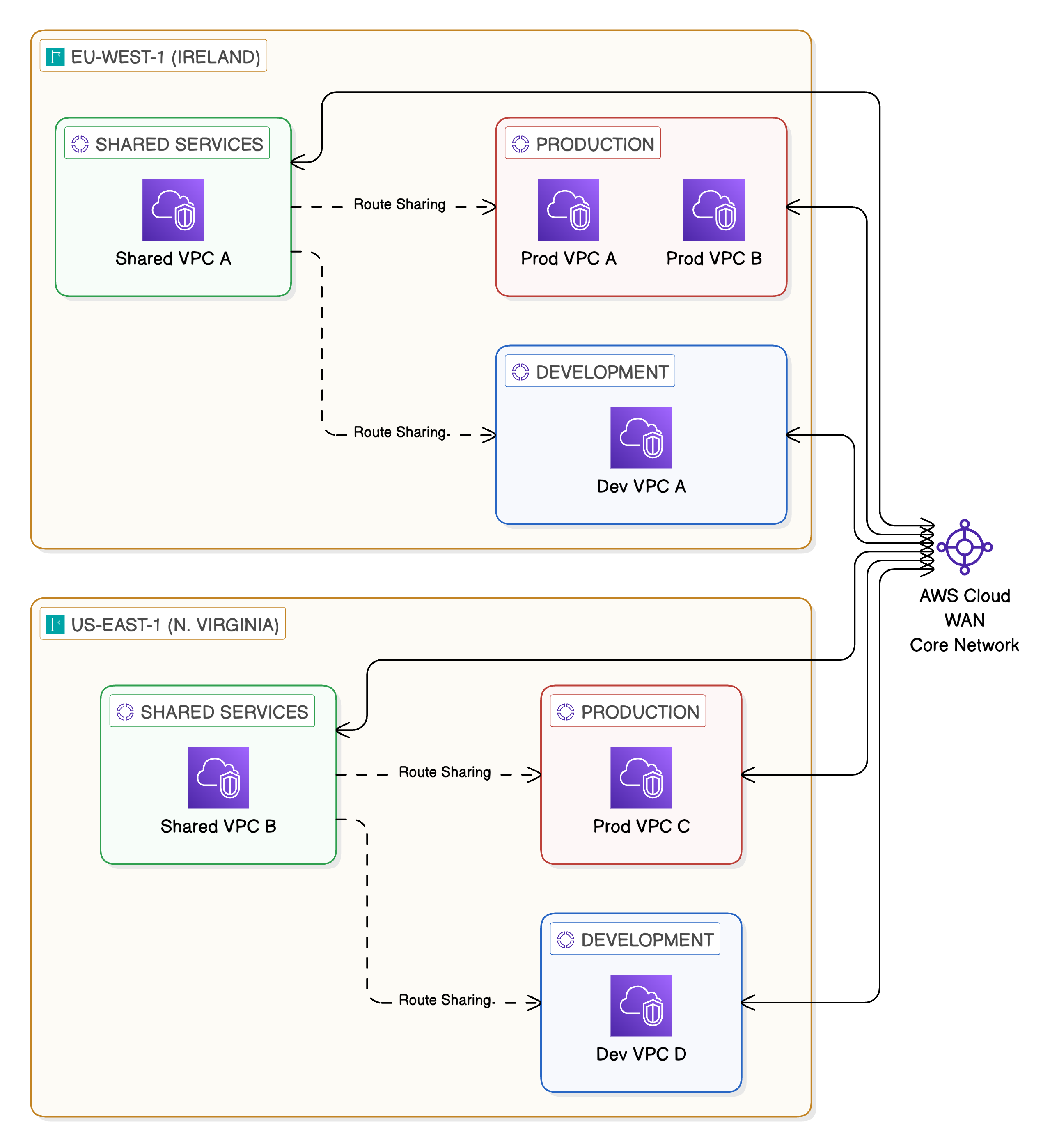
Cross-region connectivity through Core Network
- Production EU <> Cloud WAN Core Network <> Production US
- Development EU <> Cloud WAN Core Network <> Development US
- Shared Services EU <> Cloud WAN Core Network <> Shared Services US
Route sharing from Shared Services to Production and Development
- Shared Services EU –> Production EU: Route Sharing
- Shared Services EU –> Development EU: Route Sharing
- Shared Services US –> Production US: Route Sharing
- Shared Services US –> Development US: Route Sharing
Connectivity Model
Cloud WAN supports multiple connectivity options, making it suitable for organisations with diverse network requirements. Understanding these options is key to designing a connectivity model that meets both current and future needs.
VPC Attachments
VPC attachments are the most common attachment type. When attaching a VPC to Cloud WAN, you specify which subnets in the VPC should be used for the attachment. It is best practice to use dedicated subnets for Cloud WAN attachments rather than reusing application subnets. These subnets should be small (a /28 is sufficient) and exist in each Availability Zone where you require connectivity.
The VPC’s route tables must be updated to direct traffic destined for other networks towards the Cloud WAN attachment. This is typically a default route (0.0.0.0/0) or specific CIDR ranges depending on your routing design.
Site-to-Site VPN
Cloud WAN supports Site-to-Site VPN attachments for connecting on-premises locations. These VPN connections terminate on the core network and can be associated with a specific segment. This is useful for connecting branch offices or data centres that do not have Direct Connect.
AWS Direct Connect
For organisations with existing Direct Connect connections, Cloud WAN integrates through Transit Gateway attachments. A Transit Virtual Interface (VIF) is associated with a Direct Connect Gateway, which connects to a Transit Gateway. The Transit Gateway is then peered with Cloud WAN through a Transit Gateway route table attachment.
Transit Gateway Peering
Cloud WAN supports peering with existing Transit Gateways. This is particularly valuable for organisations that are migrating from a Transit Gateway-based architecture to Cloud WAN. Rather than performing a disruptive cutover, you can peer your existing Transit Gateways with Cloud WAN and migrate workloads incrementally.
The peering approach allows you to:
- Maintain existing Transit Gateway connectivity during migration
- Gradually move VPC attachments from Transit Gateway to Cloud WAN
- Run both architectures in parallel until the migration is complete
- Validate connectivity at each stage before decommissioning Transit Gateway resources
Cloud WAN Connectivity Options — Hub and Spoke
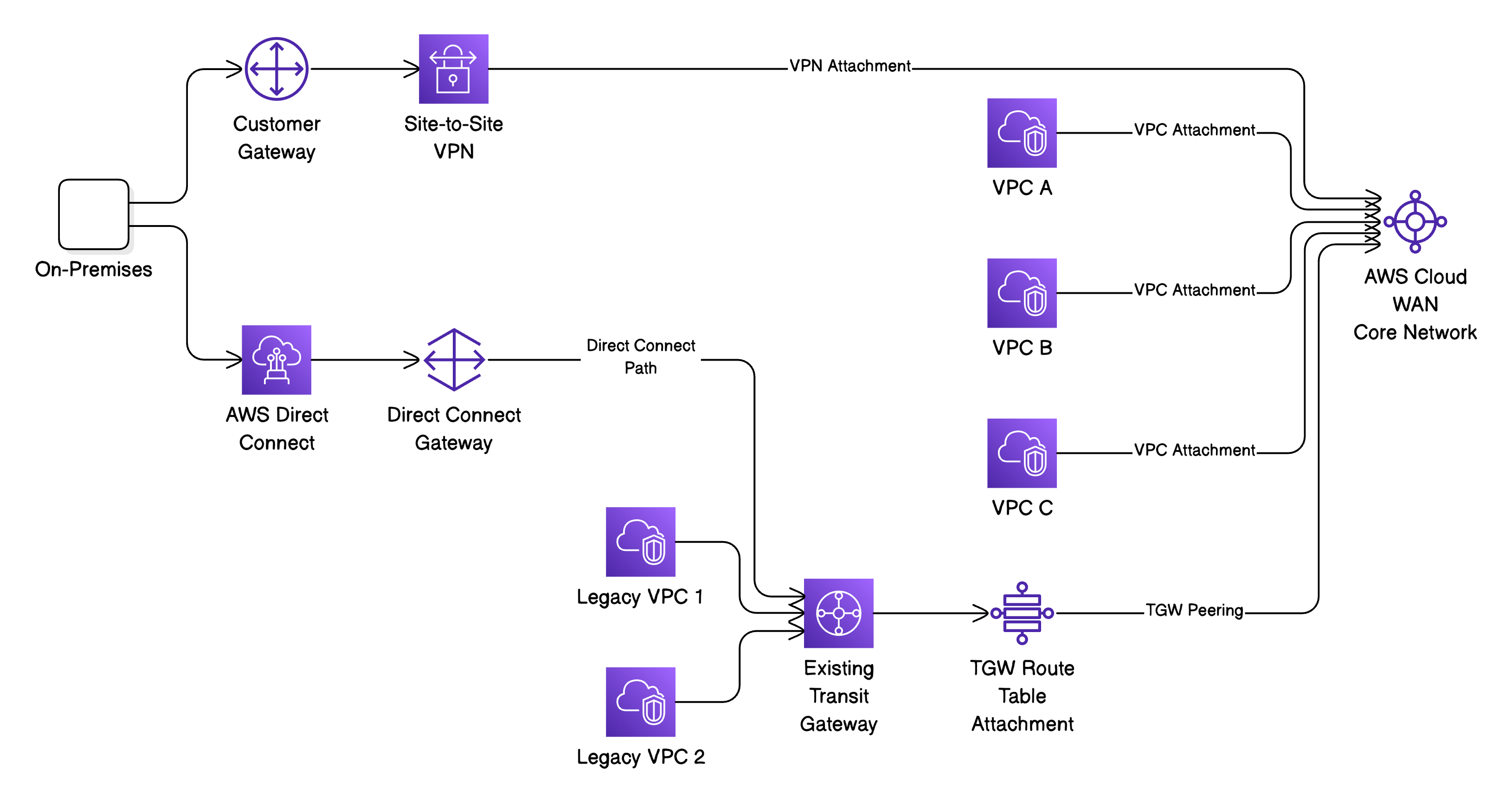
Notes:
- The TGW peering path at the bottom represents the migration path from existing Transit Gateway architecture to Cloud WAN
Security Considerations
Security is fundamental to any network design and Cloud WAN provides several mechanisms to enforce network security at the infrastructure level.
Segment Isolation
By default, segments are isolated from one another. Traffic in the Production segment cannot reach resources in the Development segment unless you explicitly configure route sharing or segment actions. This default-deny posture is a strong foundation for network security and aligns with the principle of least privilege.
Attachment Acceptance
As mentioned earlier, enabling require-attachment-acceptance on segments ensures that new attachments must be approved before they become active. This prevents unauthorised resources from gaining network connectivity and provides an approval workflow for network changes.
Centralised Traffic Inspection
For organisations that require deep packet inspection or advanced threat detection, Cloud WAN supports centralised inspection patterns using AWS Network Firewall. The approach involves:
- Creating a dedicated Inspection segment with a VPC containing AWS Network Firewall
- Configuring segment actions to route inter-segment traffic through the Inspection segment
- The Network Firewall inspects traffic and forwards permitted traffic to the destination segment
This pattern provides a single point of inspection for all east-west traffic flowing between segments, simplifying the management of firewall rules and providing consistent security policy enforcement.
Network Segmentation with AWS Organisations
Cloud WAN attachment policies can reference AWS Organisation attributes such as Account IDs and Organisational Unit (OU) tags. This allows you to create policies that automatically associate VPCs from specific accounts or OUs with the correct segment. For example, all VPCs in accounts belonging to the Production OU can be automatically placed in the Production segment.
Summary
In this first part of the series we’ve covered the fundamental design aspects of AWS Cloud WAN. We’ve looked at what the service is, its core components, and how to design a network topology that provides multi-region connectivity with built-in segmentation and security.
The key design decisions to consider are:
- Which AWS Regions to include in your core network
- How to segment your network to align with your organisational structure and security requirements
- How to integrate with existing infrastructure, particularly if you’re migrating from Transit Gateway
- Where to implement centralised traffic inspection
In Part Two I’ll walk through the implementation of a Cloud WAN network, including creating the global network, defining the core network policy, attaching VPCs, and verifying connectivity.